
To set up an employee with portal access, first navigate to the Employee Portal Screen.
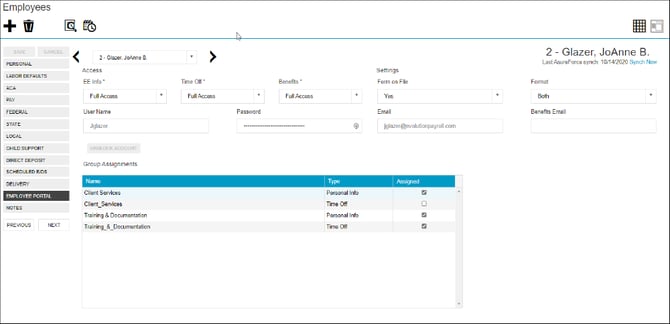
From this screen, you will be able to configure user access, login credentials, and Group Assignments.
Specifically, you'll need to set up / review:
- User Name
- Password
- Email (Email address for account notifications)
- Benefits Email (if applicable) (Email address for benefits notifications)
- Access:
- Employee Info (EE Info)
- Time Off
- Benefits
- Form on File (Are the annual return forms on file?)
- Format (Format of the returns; electronic, paper, or both)
For access to the Employee Portal, the Access Level for EE Info must be Read Only or Full Access. The Time Off and Benefits Access Levels work independently. Keep reading for a full breakdown on Access permissions.
Group Assignments are implemented at the Company level. Select the corresponding checkbox to assign or remove employees to/from various groups.
The following table breaks down access permissions for EE Info, Time Off, and Benefits:
| Access Type | No | Read-Only | Full Access |
| EE Info | Employees will not see any of their personal information in the Employee Portal. | Employees can view their payroll information but will not be able to request edits in the Employee Portal. |
Employees can see and request edits to their payroll and W-4 information. |
| Time Off | Employees do not see any of their time off information in the Employee Portal. | Employees can view their time off information but will not be able to request edits in the Employee Portal. |
Employees can see and request edits to their time off information. |
| Benefits | Employees do not see any of their benefits information in the Employee Portal. | Employees can view their benefits information but will not be able to make elections in the Employee Portal. |
Employees can see and request edits to their benefits elections in the Employee Portal (during Open Enrollment and/or a Qualifying Event Enrollment). |
If an employee gets locked out of the employee portal, see this article on What to do if a user gets locked out of the employee portal in Evolution Web Payroll.