
Depending on the level of login security set for the user, at a certain point the user will become locked out of their account and their account blocked if they fail to login.
In most cases, three unsuccessful login attempts will lock the account, forcing the user to answer their security questions. Three incorrect answers to security questions will block the account.
If the user has the highest security setting on the account, the account will become immediately blocked after three unsuccessful login attempts.
If either of the above happens, the user will get a message that the account is blocked, and it will instruct them to contact their service bureau. However, you can fix this yourself.
How to Unblock an Account
In order to unblock an account, you need to navigate to the Employee Portal Screen. Once there, you'll see a button to "Unblock Account".
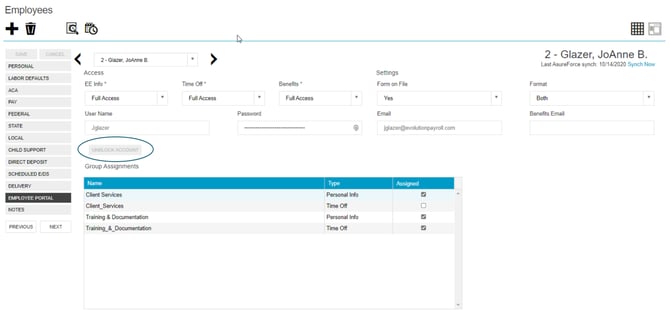
Click this button. The portal will then provide you with a temporary password to provide to the user. Once the user logs back in with this temporary password, they will be prompted to set a new password, as well as reset their security questions.